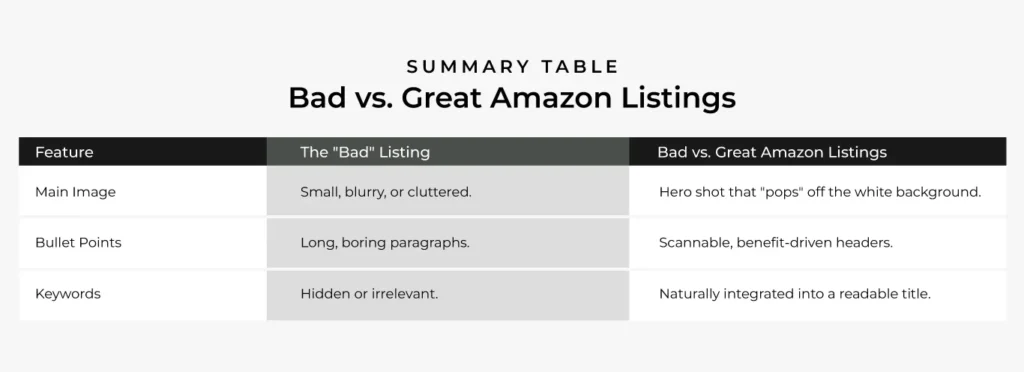
There are 3 simple ways to identify if your amazon listing images are the main problem or not.
Amazon isn’t just a shop; it’s a search engine. A bad listing doesn’t just lose sales—it gets buried on page 10 where even Jeff Bezos couldn’t find it. If you ever think you’re not getting clicks or sales the problem is probably the product listing or product itself. But if you think your product is great but still not drive clicks to your amazon product page like who’s willing to sell a product that people don’t buy.
On Amazon, your listing is your only salesperson. If it’s not performing, your “Best Seller Rank” (BSR) will tank, and your ad spend will evaporate. Before you pour more money into PPC, check if your listing is actually “retail ready.”
Here are 3 simple ways to identify if your Amazon listing is working against you:
1. The “Unit Session Percentage” is Below 10%
In Amazon-speak, your “Unit Session Percentage” is your conversion rate. You can find this in your Business Reports under “Sales and Traffic.”
The Diagnostic: If your USP is consistently below 10% (for most categories), your listing is a “leaky bucket.”
Why it’s a bad listing: High traffic but low sales tells Amazon’s A9 algorithm that your product isn’t what customers want. This leads to higher ad costs and lower organic rankings.
The Fix: If people are clicking but not buying, your Price, Social Proof (Reviews), or Bullet Points are likely the problem.
2. The “Mobile Scroller” Fail
Over 50% of Amazon shoppers buy on their phones. On the Amazon app, the images and titles are almost the only things people see before the “Buy Now” button.
A bad listing fails the mobile test if:
The Main Image is “Weak”: If your product doesn’t take up 85% of the white frame or looks flat compared to the competition, people will scroll right past you.
The Title is “Keyword Stuffing” Nonsense: If your title looks like a string of random words (Premium Silicone Spatula Blue Large Heat Resistant Best Gift 2024…), it looks spammy and untrustworthy to a human reader.
3. The “Pain Point” Gap (Most Important)
Amazon customers are usually looking for a solution to a specific problem. A bad listing focuses on features rather than benefits.
Bad Listing: “This water bottle is 32oz and made of stainless steel.” (Feature)
Good Listing: “Keep your water ice-cold for 24 hours—even in a hot car.” (Benefit/Pain Point)
The Test: Look at your “Negative Reviews” or your competitors’ reviews. If customers are complaining that a product is “too heavy” or “hard to clean,” and your listing doesn’t explicitly say “Lightweight” or “Dishwasher Safe,” you are leaving money on the table.